בניית אתרים עם AI
אינטראקציות לאתר: המילים שצריך להגיד לקלוד כדי שהאתר לא ייראה כמו סלופ
כשלא יודעים איך קוראים לאפקט, קלוד בונה את הממוצע. 12 אינטראקציות מהאתרים שבניתי, כל אחת עם השם שאומרים לקלוד, קליפ קצר ופרומפט להעתקה, ובסוף מה בודקים לפני שעולים לאוויר.
תבקשו מקלוד "אתר עם אנימציות מגניבות", ותקבלו מה שכולם מקבלים: טקסט בגרדיאנט סגול, שלושה כרטיסים זהים עם אייקונים, והכול נכנס באותו fade. כשלא יודעים איך קוראים לאינטראקציה, הסוכן מנחש, והניחוש שלו הוא הממוצע של כל האתרים שהוא ראה. ברגע שנותנים לה שם, מקבלים את הדבר עצמו.

לקראת ההרצאה COPY. PASTE. TASTE. אספתי את כל האינטראקציות מהאתרים שבניתי עם AI למילון אחד: 45 כרטיסים, לכל אחד שם בעברית, המונח באנגלית, קליפ מהאתר ופרומפט. כאן בחרתי 12 שהכי שווה להכיר, ובסוף החלק של העלייה לאוויר.
מה יש בכל פרומפט
הפרומפטים כאן באנגלית, כי בזה קלוד מדויק יותר במונחים טכניים. כולם בנויים באותה צורה, וכדאי להכיר אותה כדי לכתוב כאלה בעצמכם:
השם
המונח באנגלית, כמו scroll-scrubbing. זה מה שקלוד מכיר, וזה מה שמונע ממנו לנחש.
המספרים
כמה פיקסלים, כמה מעלות, כמה שניות. "קצת" זה ממוצע. 4 מעלות זו החלטה.
התחושה והאיסור
משפט אחד שמתחיל ב-It should feel like, ומשפט אחד שמתחיל ב-Do NOT. האיסור הוא המקום שבו עוצרים את הסלופ.
גרסה שקטה
מי שביקש במכשיר שלו פחות תנועה (prefers-reduced-motion) מקבל דף עומד. שורה אחת, בכל פרומפט.
בדיקה עם הוכחה
כל פרומפט נגמר ב-"תבדוק בדפדפן אמיתי ב-390 פיקסלים ובמחשב ותראה לי". בלי זה קלוד אומר "סיימתי" על דף שהוא לא ראה.
ולפני שמוסיפים משהו, מורידים. זה הפרומפט שפותח את ההרצאה: מדביקים אותו עם הדף שלכם, ומקבלים את כל הקלישאות של אתר AI שיש בו, וגם מה לשים במקום.
Review this page and list every element that is a generic AI-website cliché: gradient text, purple-to-pink buttons, three identical feature cards, floating 3D blobs, chrome headlines, glassmorphism without contrast, stock-photo people, meaningless icons. For each one, propose a specific replacement grounded in this brand's actual material. Do not soften the list.גלילה וטקסט
הגלילה מריצה סרטון (scroll-scrubbing)
גוללים למטה והתנועה מתקדמת, גוללים למעלה והיא חוזרת, כאילו הגלילה היא ידית של עורך וידאו. במפלס זה בכלל לא וידאו: 121 תמונות, והגלילה בוחרת איזו מהן מוצגת. שווה לרגע אחד גדול שמספר סיפור. וכמעט תמיד הולך יחד עם pin: החלק נעצר במסך בזמן שגוללים, אחרת האנימציה בורחת למעלה לפני שראיתם אותה.
Tie this animation to scroll position (scroll-scrubbing): scrolling down advances it, scrolling up reverses it exactly. If it is a filmed movement, export the video as about 120 small WebP frames and draw them on a canvas by scroll progress. It should feel like dragging a video scrubber. Do NOT make it a one-shot animation that plays once. Keep native scrolling on phones. With prefers-reduced-motion show one still frame. Check it in a real browser at 390px and desktop and show me.המילים נכנסות אחת אחרי השנייה (stagger)
במקום שהכול יופיע בבת אחת, כל מילה או כרטיס נכנסים בתורם, עם הפרש קטן ביניהם. ב-davka הכותרת נבנית מילה אחרי מילה. על כותרת אחת זו כוריאוגרפיה. על כל פסקה בדף זה כבר סלופ.
Bring these words (or cards) in one after another with a stagger of about 0.06s, a small upward move and a slight overshoot, when they enter the screen. For one key paragraph, fill the words from light grey to black as the user scrolls. It should feel like choreography, quick and light. Do NOT use it on every section, and keep Hebrew words whole. With prefers-reduced-motion show everything at once. Check it in a real browser at 390px and desktop and show me.מרקר שנמרח על מילה (highlighter sweep)
פס צבע עובר מאחורי מילה אחת כמו מרקר אמיתי, ורק אחרי שהמילה כבר על המסך. בעברית הוא מתחיל מימין. מילה אחת. מרקר על כל שורה זה רעש, וצבע רקע קבוע מופיע לפני המילים והרגע הולך לאיבוד.
Add a highlighter behind one key word: a separate element behind the text that animates transform: scaleX from 0 to 1 with transform-origin right (Hebrew RTL), over about 0.6s, and fires only after the headline has finished landing. It should feel like a real marker stroke. Do NOT use a background color on the text, and do NOT mark more than one word. With prefers-reduced-motion show it already drawn. Check it in a real browser at 390px and desktop and show me.הדמות נוגסת בכותרת (z-layer sandwich)
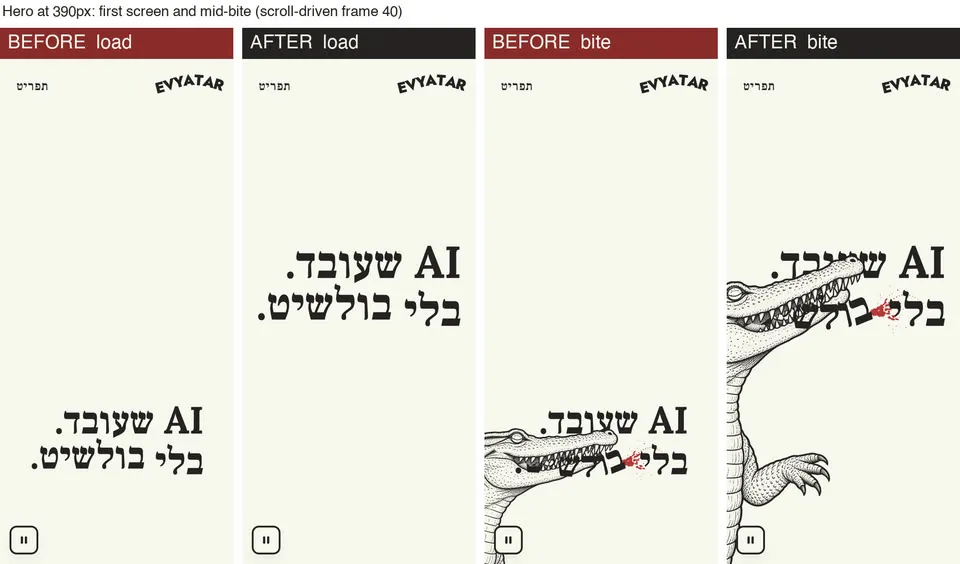
הכותרת יושבת בין שתי שכבות של אותה דמות: הגוף מאחוריה והראש מלפניה. התנין הוא תמונת AI אחת שהקוד חותך לגוף, ראש ורגל, וכשגוללים הוא נוגס ב"בולשיט". שלוש שכבות של תמונה אחת, וזה כל הקסם. והטקסט תמיד ב-HTML: תבקשו מ-AI דמות שמחזיקה כותרת, ותקבלו עברית משובשת בתוך התמונה.
Layer the hero as a sandwich: cut the character image in code into body, head and front leg (same file, so they line up), put the body behind the headline and the head above it, so the last word sits between them. On scroll, rotate the head about 22 degrees around the neck to bite that word and remove it. It should feel physical and a little funny. Do NOT put Hebrew text inside an image. With prefers-reduced-motion show the final frame. Check it in a real browser at 390px and desktop and show me.עכבר וחשיפה
תמונה שרודפת אחרי העכבר (hover preview)
רשימה נקייה של שמות, וכשעוברים על שורה התמונה שלה צפה ליד העכבר ונוסעת איתו, באיחור רך. לאיחור הזה קוראים lerp, וזה הסוד של כל דבר שמרגיש חלק. זה הפתרון לשישה כרטיסים זהים. בטלפון אין עכבר, אז שם התמונה יושבת בתוך השורה (זה כבר בפרומפט).
Show these items as a large typographic list, one row each. On hover, a thumbnail appears and follows the cursor with lerp (about 0.12), tilting slightly in the direction of movement, and swaps when the row changes. It should feel light and curious. Do NOT turn it into a card grid. Keyboard focus shows the same preview. On phones show the thumbnail inside the row. With prefers-reduced-motion, no tilt or follow. Check it in a real browser at 390px and desktop and show me.פנס שחושף שכבה שנייה (spotlight reveal)
שתי תמונות באותו מבנה, אחת על השנייה, והעכבר חושף את השנייה בעיגול רך. ב-GESSO עדשה עוברת על ציור בסגנון רנסנס וחושפת מתחתיו שרטוט הנדסי. הקסם נמצא בתמונות: הן חייבות להתיישר פיקסל לפיקסל, אז מג'נרטים אחת ועורכים ממנה את השנייה.
Stack two images with identical framing. A soft circular spotlight (about 180px, feathered) follows the cursor with lerp and reveals the top image through a radial-gradient mask-image, plus -webkit-mask-image for Safari; optionally leave a trail that fades within a second. It should feel like a flashlight finding a hidden layer. Do NOT use a hard-edged circle. On touch, follow the finger. With prefers-reduced-motion show a fixed reveal. Check it in a real browser at 390px and desktop and show me.משהו נחשף או נקרע לפי צורה (clip-path)
אלמנט נחתך לצורה, והצורה משתנה: נחשף מצד לצד, נפתח כמו חלון או נקרע לשניים. ב-GESSO הדלתות נפתחות וחותם השעווה נקרע לאורך קו משונן, וכל חצי נוסע עם הדלת שלו. בשביל זה כשהרעיון מכתיב צורה: חלון, קרע בנייר, חותם.
Reveal this element with an animated clip-path, from inset(0 0 0 100%) to inset(0) over 0.8s when it enters the viewport, so it wipes in from right to left (Hebrew). It should feel like a clean wipe with a crisp edge. Do NOT fade it at the same time. For a torn-paper effect use polygon() with the same number of points in both states. With prefers-reduced-motion show it immediately. Check it in a real browser at 390px and desktop and show me.פיזיקה
גוררים, זורקים, וזה נוחת בקפיץ (drag inertia + spring)
גוררים בעכבר או באצבע, עוזבים, והגלגל ממשיך להסתובב, עובר קצת את היעד וחוזר כמו קפיץ. על אתר ההשראה כתבתי לקלוד "הופ קטנטנים", ומתברר שלהופ יש שם: elastic. ובטלפון, הגרירה לרוחב לא חוסמת את הגלילה של הדף (זה ה-touch-action בפרומפט).
Let visitors drag this wheel with mouse or finger (pointer events). On release, keep it spinning with the release speed, slow it with friction, and let it settle on the nearest scene with a small spring overshoot (GSAP elastic.out(1.2, 0.8)); a short drag springs back. It should feel heavy and playful. Do NOT block vertical page scrolling on phones (touch-action: pan-y). Arrow buttons and keys rotate it too. With prefers-reduced-motion jump between scenes. Check it in a real browser at 390px and desktop and show me.דברים שנופלים ומתנגשים (physics, Matter.js)
מנוע פיזיקה קטן מחשב נפילה והתנגשות, ואותיות או קלפים בדף מתנהגים כמו חפצים. במפלס תיק משפטי נופל על הכפתור, והאותיות של הכותרת מתפרקות, נופלות ונערמות. לרגע אחד של הפתעה, אחרי לחיצה.
When the case file drops onto the button, split the headline into letter spans and make each one a Matter.js body synced to the DOM every frame, so they fall, collide and pile on the button; after a few seconds everything flies back. It should feel like a chain reaction. Do NOT create the bodies as static (create them dynamic, then setStatic). Run it only on click. With prefers-reduced-motion skip the physics. Check it in a real browser at 390px and desktop and show me.רגעים שזוכרים
גשם ואדים שמצוירים בקוד (shader)
תוכנית קטנה שמציירת כל נקודה על המסך בזמן אמת, ולכן אפשר לקבל מים, ערפל או גשם שזזים בלי שום סרטון. בעוד קצת הגשם והאדים על החלון הם שיידר אחד. תמיד מבקשים תמונת גיבוי, כי לא בכל מכשיר יש WebGL.
Write one full-screen fragment shader in raw WebGL (no three.js) for this effect: <a procedural ocean wave that rises with scroll / rain and fog on a window that the pointer wipes away>. It should feel like real water, never like a looping video. Do NOT add a 3D library or a video file. Pause rendering when it is off screen, and fall back to a still photo if WebGL fails. With prefers-reduced-motion render one still frame. Check it in a real browser at 390px and desktop and show me.נושפים לטלפון, והאתר מגיב (microphone breath)
האתר מקשיב למיקרופון ומזהה נשיפה לפי צורת הצליל: רעש נמוך ורחב, לא דיבור. בעוד קצת נושפים, האדים מתפשטים על החלון ושאלה נכתבת עליו בכתב יד. זה הרגע שאנשים זוכרים מהאתר. מבקשים רשות רק אחרי לחיצה, שום דבר לא מוקלט, ומי שלא נותן מיקרופון מקבל לחיצה ארוכה.
Ask for the microphone only after a tap. Analyse the input with the Web Audio API and detect a breath as low-frequency broadband noise, telling it apart from speech by its sound shape. A breath spreads fog over the window within about one second. It should feel immediate and a little magical. Never record or send audio anywhere. Fallback: press and hold. With prefers-reduced-motion fade the fog in gently. Check it in a real browser at 390px and desktop and show me.הפתעות שמגלים רק כשמשחקים (easter eggs)
דברים שלא מופיעים בתפריט ולא מוסברים. בשולחן העבודה של האתר הזה יש אייקון Desktop Destroyer: פטיש, להביור וצבע על החלונות. מי שמוצא, נשאר ומספר לחבר. רק לא מחביאים שם שום דבר חשוב: הפתעה היא בונוס.
Hide two or three small interactions that are never explained, like a hint after a few idle seconds, a secret double-click or a key combo, and reward each with a small surprise. It should feel like a wink to curious visitors. Do NOT hide navigation or content behind them, and make them reachable by keyboard too. With prefers-reduced-motion keep the reward but drop big motion. Check it in a real browser at 390px and desktop and show me.לעלות לאוויר
אתר שיושב במחשב לא קיים. זה מה שאני עושה לכל אתר לפני ששולחים קישור:
כתובת תוך דקה (Netlify Drop)
גוררים את תיקיית האתר ל-app.netlify.com/drop ומקבלים כתובת שנגמרת ב-netlify.app. ככה עלו כל אתרי ההרצאה. בונים ב-Codex? אפשר לפרסם ישר מ-ChatGPT (ChatGPT Sites).
דומיין משלכם
את evyataryizhak.com קניתי ב-Cloudflare ב-10.46 דולר לשנה. מדליקים חידוש אוטומטי, ומוודאים שגם הכתובת עם www מגיעה לאותו מקום.
טלפון קודם
רוב האנשים יפתחו את הקישור מוואטסאפ או מסטורי. בודקים ב-390 פיקסלים, בלי גלילה לרוחב, ולכל רגע שעובד רק עם עכבר יש תחליף במגע.
SEO: שגוגל ימצא
כותרת ותיאור לכל דף, תמונת שיתוף (היא מה שקופץ כשמשתפים בוואטסאפ), sitemap.xml, ולמחוק noindex שנשאר מתקופת הבנייה.
GEO ו-AEO: שה-AI ימליץ עליכם
קובץ llms.txt שמסביר במילים פשוטות מי אתם ומה יש באתר, ונתוני schema.org. ככה ChatGPT, Claude ו-Perplexity מבינים מי אתם. רק מה שנכון, בלי שירותים או ביקורות מומצאים.
אבטחה וכפתור עצירה
כותרות אבטחה: evyataryizhak.com קיבל A ב-securityheaders.com ומפלס קיבל A+. וכפתור עצירה לכל מה שזז לבד.
והפרומפט האחרון, זה שאני מדביק לפני כל עלייה לאוויר:
Before we go live, audit this site and fix what fails: (1) accessibility per Israeli Standard 5568, Hebrew RTL, a pause button for any motion; (2) privacy: no cookies or trackers without consent; (3) security: no secrets in the front-end, security headers set; (4) mobile at 390px with no horizontal scroll; (5) SEO: title, description, share image, sitemap. For each item give pass or fail with proof. Don't tell me "done". Show me.קלוד יודע לבנות כמעט הכול. מה שחסר לו זה השם.
שאלות נפוצות
איך עושים שאתר שבניתי עם AI לא ייראה כמו סלופ?
קודם מורידים את הקלישאות: טקסט בגרדיאנט, שלושה כרטיסים זהים עם אייקונים, הכול נכנס באותו fade. אחר כך בוחרים אינטראקציה אחת שהיא המסר של האתר וקוראים לה בשם שלה באנגלית, עם מספרים, משפט על התחושה ומשפט על מה שאסור. במדריך יש פרומפט אבחון ו-12 אינטראקציות עם פרומפט לכל אחת.
איך קוראים לאפקט שבו הגלילה מריצה סרטון?
scroll-scrubbing. גוללים למטה והתנועה מתקדמת, גוללים למעלה והיא חוזרת. בדרך כלל זה רצף של כמאה תמונות שמצוירות על canvas לפי מיקום הגלילה, יחד עם pin שמחזיק את החלק במסך בזמן שגוללים.
מה זה lerp?
איחור רך: אלמנט שעוקב אחרי העכבר מתקדם בכל פריים רק חלק מהמרחק, ולכן הוא מגיע באיחור ונעצר בעדינות. זה מה שגורם לסמנים, לתמונות שרודפות אחרי העכבר ולפנסים להרגיש חלקים.
צריך לדעת לתכנת כדי להשתמש בפרומפטים?
לא. מעתיקים את הפרומפט לשיחה עם Claude Code או Codex בתוך תיקיית האתר, וקלוד כותב את הקוד ובודק אותו בדפדפן ב-390 פיקסלים ובמחשב.
מה בודקים לפני שמעלים אתר לאוויר?
נגישות לפי ת"י 5568 עם כפתור עצירה לכל מה שזז, פרטיות (בלי עוגיות לפני הסכמה), אבטחה (בלי מפתחות בקוד, כותרות אבטחה), מובייל ב-390 פיקסלים בלי גלילה לרוחב, ו-SEO: כותרת, תיאור, תמונת שיתוף ו-sitemap.